
Skip to content
Resale

Every resale, watched from listing to close

Record the unit and its owner, let AI draft the listing, switch on Property Finder, Bayut and Dubizzle, and run the offers on a resale deal with the commission estimated beside them.

Three model doors in a white wall, one navy, with keys hanging on a rack
A listing record for a three-bed apartment: price, rooms, area and an AI-written description

Raptor Neo takes on

Drafting the listing, keeping each portal's status in view and re-scoring buyers when the price moves.

You keep

Winning the instruction and getting the offer agreed.

  • Offers created, accepted or rejected on the deal
  • A price change re-scores every buyer
  • Commission type, rate and split on the listing
How it flows

One instruction in, a sale on track

What goes in

  1. 01 The owner Landlord contactThe unit
  2. 02 The listing details PricePhotosRooms and area
  3. 03 The commission Percentage or fixedAgent split
A listing record for a three-bed apartment: price, rooms, area and an AI-written description

What comes out

  • Portal listings Property FinderBayutDubizzle
  • Ranked buyers AI Match %
  • The resale deal OffersCommission estimate
What it does

Draft it, check it, publish it once

Fill in the unit's details and press AI Generate for a title and description in your agency's writing style. Read it, edit it, set the listing to Active and switch on the portals it should appear on.

  • One record feeds all three portals
  • Only Active listings are sent out
  • Published or unpublished, shown per portal

A model house with lines of blue light running out to a row of small billboards

Cut the price, see who fits now

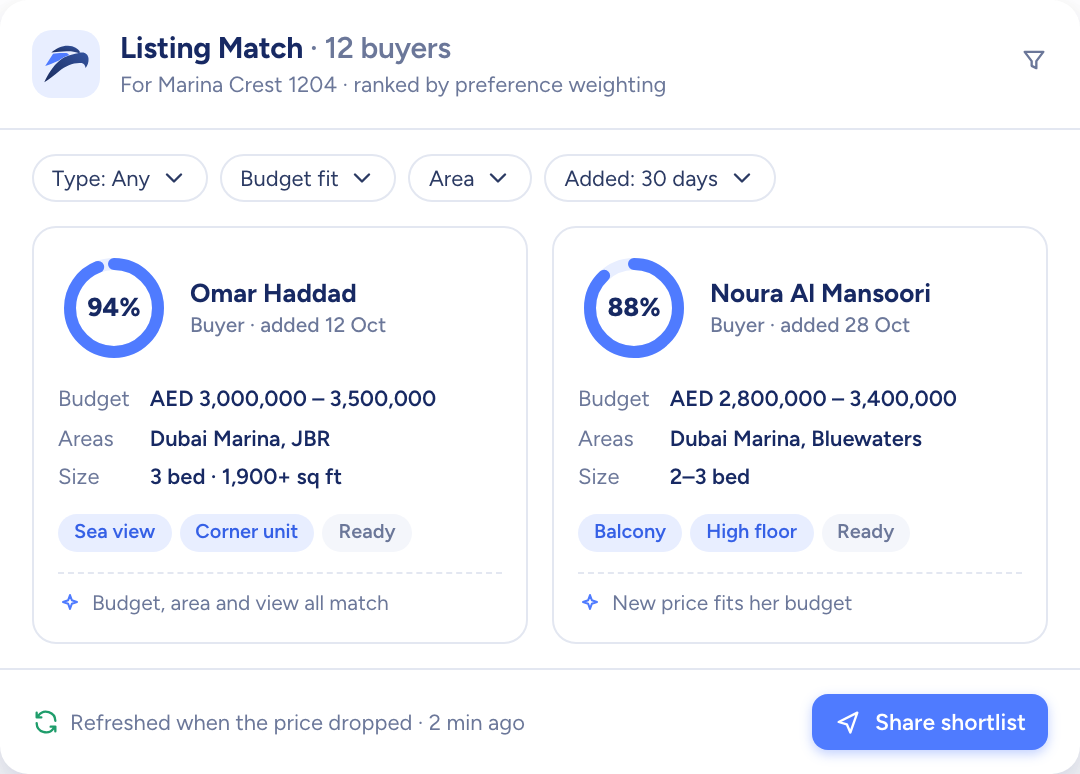
AI Match scores the listing against every buyer's requirements and the weight each buyer puts on each factor. Change the price or any other detail and the scores are worked out again, so the shortlist in front of you stays current.

  • A match percentage for each buyer
  • Ten factors, each weighted from 1 to 5
  • Matched buyers added to a campaign in one step
The raptor chick watching over rows of white model houses, one of them lit blue
Buyers ranked for one listing by match percentage, with budget, areas and size

Every offer, on the deal record

Log each offer with its price, date and notes. Accept one and the deal moves forward; reject one and it stays on record while you take the next. The commission estimate sits alongside, built from the agreed rate and the agent split.

  • Offers marked pending, accepted or rejected
  • Lost deals closed with a reason
  • Commission estimate with the agent split
A model house moving along a track through a series of white arches towards a key

How resale teams use Raptor Neo

Open any module below to see how it does the job.

Questions

Asked and answered

Is the commission set on the listing or on the deal?

Both. On the listing you set how commission is charged, as a percentage or as a fixed sum, with its rate and how it divides between agent and co-agent.

The deal then shows an estimate built from the agreed rate and that split.

Does the listing status change when the deal does?

Yes. A listing's status follows its deal's stage automatically. Only a few roles can override it by hand, and they get a warning when they do.

Can I see how long a unit has been on the market?

Yes. Each listing shows its days on market, counted from the day it went Active, and its price per unit of area.

What happens after a rejected offer?

The offer is kept on the deal, marked as not accepted, and you can log the next one. Once you accept an offer, the deal moves on to its next stage.

Which language does AI write the listing in?

English. Titles and descriptions are drafted in English, in the writing style your agency has chosen, and you edit them before anything is saved.

Every dealin sight.

Start the free trial today, or book a demo and see it run on your own listings.