Skip to content
Campaigns

Send the shortlist. Buyers pick the viewings.

Choose the matched buyers and the listings, tell the AI what the email is for, and it drafts the copy in your agency's style. The campaign's share page lets each buyer browse the homes and ask for a viewing time.

Paper planes flying out of a white model mailbox past two model houses
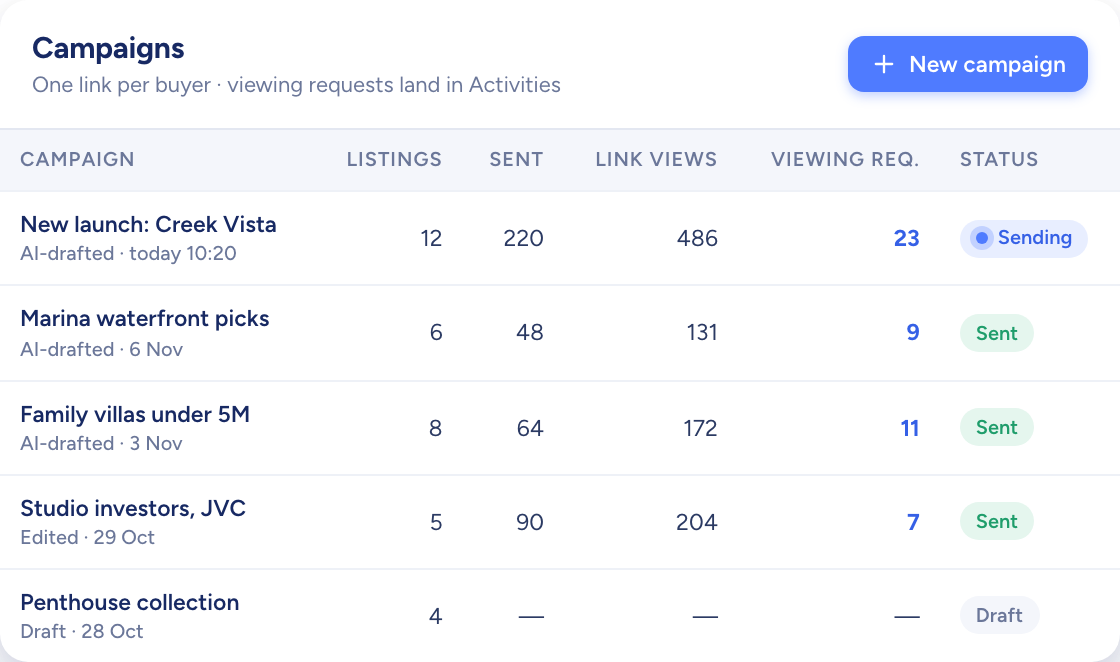
A table of campaigns with listings, link views and viewing requests per campaign
  • Up to three AI drafts to choose between
  • Views of every campaign's share link counted
  • All campaigns in a table or on a kanban
How it flows

Buyers and listings in, viewing requests out

What goes in

  1. 01 Who it goes to AI Match resultsContact list
  2. 02 What it shows One listingSeveral listings
  3. 03 How it reads Writing styleTemplate
A table of campaigns with listings, link views and viewing requests per campaign

What comes out

  • The email Your own mailbox
  • A share page Add to viewings
  • The response Link viewsViewing requests
What it does

Say what it's for, and AI writes the email

Pick the contacts and the listings, describe the email in a line, and AI Generate drafts it in the writing style your agency set. Move between up to three versions, keep the best one and edit it before it goes.

  • Plain text, or a template for one or several listings
  • Dynamic fields for names, prices and areas
  • Up to 10 attachments on a campaign
Paper planes flying out of a white model mailbox past two model houses
You add
  • Your shortlist
  • The listings
  • Writing style
Raptor Neo

A share page that books viewings

A campaign with listings gets its own link. Buyers open it, choose the homes worth a visit and pick a time. Each request is emailed to you and waits on the Activities page until you confirm it or cancel it.

  • Copy the link into any chat, or send it by email
  • Confirming creates the viewing in your calendar
  • The buyer receives the schedule by email
An arc of small message cards passing over a row of model houses

Sent from your address, followed up in one place

Connect your Gmail or Outlook account and campaigns go out under your own name. Each one then shows how often its share link was viewed, beside the viewing requests it brought in.

  • Send now, or schedule it in your workspace's time zone
  • Duplicate any campaign as a fresh draft
  • Switch between table and kanban views
A curved white model desk with three blank screens and a blue glow
A table of campaigns with listings, link views and viewing requests per campaign

Campaigns at work

The jobs it takes off an agent's desk, week in, week out.

Questions

Asked and answered

Which email account does a campaign send from?

Yours. Connect your Gmail or Outlook account and campaign emails go out under your own address rather than a system one.

What happens when a buyer asks for a viewing?

The request is emailed to you and appears on the Activities page. Create the viewing to confirm it, or cancel the request.

Once you confirm, the buyer receives the viewing schedule by email.

Where can I start a campaign?

From the Campaigns page, from AI Match, or from the matches on a contact or listing record. Or tick a batch of people on the Contacts page and drop the whole selection into a campaign at once.

Can I schedule a campaign?

Yes. Send it straight away, or set a date and time. Scheduled emails follow your workspace's time zone.

Can I delete a campaign after it has gone out?

No. A sent campaign stays on record. Duplicate it instead, and you get a new draft with the same content.

Who can see my campaigns?

You, your team lead and your agency's admin. Other agents don't see the campaigns you create.

Every dealin sight.

Start the free trial today, or book a demo and see it run on your own listings.