
Skip to content
Assistant

Ask Raptor, and the day comes into focus

Raptor works from your own contacts, deals, listings and activities. It ranks what to tackle first, briefs you before a call, turns a rough note into a logged call and does the sums. Nothing is written to a record until you approve its card, and replies come back in the language you used.

The raptor chick on a round plinth ringed with blue light, among white model buildings
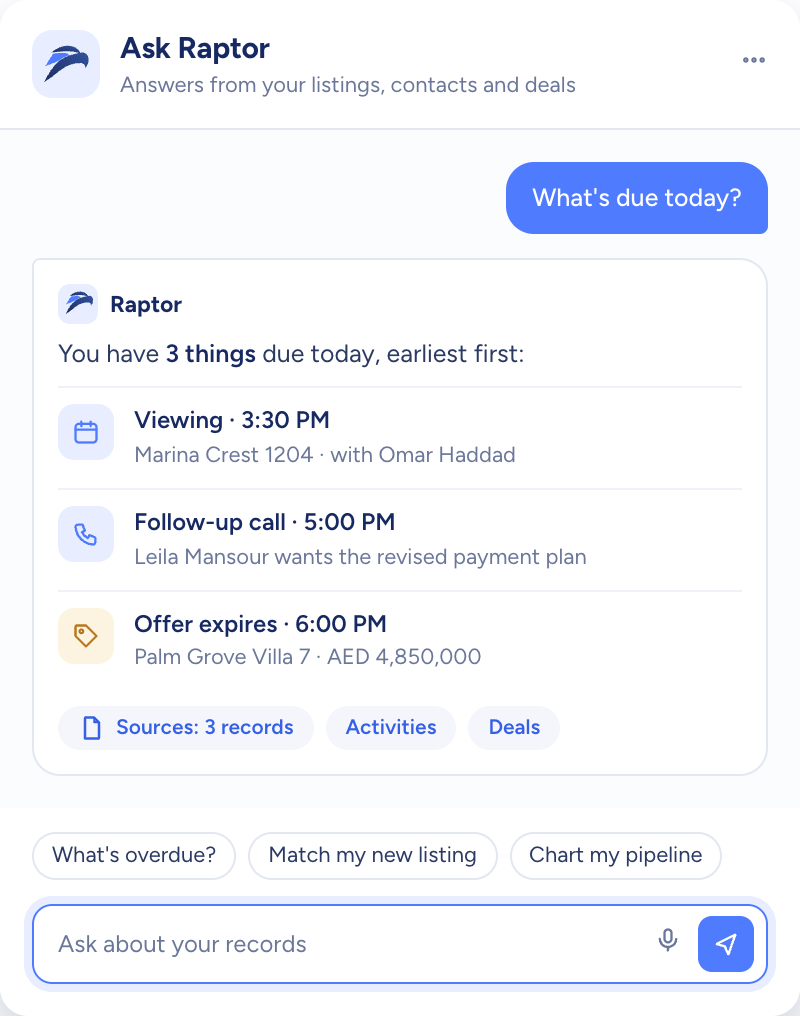
Raptor answering “What's due today?” with a viewing, a follow-up call and an offer deadline, each linked to its record
  • Changes sit on a card until you approve
  • Your language in, your language out
  • A help pane for how-to questions
How it flows

Your records in, the next move out

What goes in

  1. 01 What it reads ContactsListingsDealsActivities
  2. 02 Your phrasing Rough notesAny language
  3. 03 Where you are Prompts for this page
Raptor answering “What's due today?” with a viewing, a follow-up call and an offer deadline, each linked to its record

What comes out

  • The day, ranked Top threeBuyers gone quiet
  • Call briefs Her positionThe price gapWhat to raise
  • Cards to confirm Call logCall-backContact edit
What it does

Spot the priority call, then ring with a plan

Ask Raptor how the day should run and it ranks three jobs, each with the reason it comes first. Ringing a buyer about a unit? It sets out talking points, measures her figure against the asking price and reads her position off the latest call note.

  • A ranked top three, reasons included
  • Hot buyers left 14 days without contact
  • Listing briefs checked against the buyer's wishes

A white model phone among map pins, a key and a speech bubble

Type it rough. Confirm it clean.

After a call, write it up the way you'd text a colleague. Raptor reads the shorthand, drafts the call log and the call-back as cards marked Needs your OK, and writes nothing until you press confirm. Edit cards show the record NOW and AFTER, and a new contact is screened for Possible duplicates first.

  • Several changes from one note, confirmed one by one
  • Cancel a card and the record stays as it was
  • Raptor can undo a change it made
A white model desk buried in loose forms, sticky notes and a corded phone
You add
  • Who you spoke to
  • What was agreed
  • When to call back
Raptor Neo

Repayments and yield, worked out on the spot

Give Raptor a price, deposit, rate and term and it returns the monthly repayment. It also works out the yield on a unit, gross and net, and how a commission splits between two sides. The mortgage card keeps every field editable, and its Try a rate slider shows the repayment at other rates.

  • Repayment, yield and split, without a spreadsheet
  • Fields you can change on the card itself
  • Charts drawn from your own deals on request
Three model doors in a white wall, one navy, with keys hanging on a rack

Raptor at work

The jobs it takes off an agent's desk, week in, week out.

Questions

Asked and answered

Will Raptor change a record without asking me?

No. Raptor drafts each change on a card marked Needs your OK and writes nothing until you confirm. Cancel the card and the record is left alone.

Changed your mind after confirming? Ask Raptor to undo it, and its own change is reversed.

Which languages can I ask in?

Any language you like. Raptor answers in the language of the question, so an Arabic question gets an Arabic answer, drawn from your records like any other.

Listing descriptions that AI writes are in English at launch.

What does Raptor work from?

The contacts, deals, listings and activities in your workspace. What it can do follows the permissions of your role, and record lookups and charts end with a short source line showing what was counted.

Does Raptor contact clients for me?

No. Raptor doesn't send emails or messages and doesn't place calls. It can draft a message for you to copy and send yourself, and after a call it logs what happened and sets the call-back once you confirm.

Does Raptor answer how-to questions?

Yes. Ask how a task is done and the answer links the matching help article, which opens in a pane beside the chat. The suggested questions also change with the page you're on.

Every dealin sight.

Start the free trial today, or book a demo and see it run on your own listings.