
Skip to content
Asia

The whole desk in one CRM, wherever in Asia you sell

Bring in your spreadsheets, keep buyers, tenants and landlords on detailed profiles, let AI Match rank who fits each listing, and run your deals on stages you set yourself.

A navy card-index box of white cards beside a corded phone and model houses

Raptor Neo takes on

Ranking buyers for every listing, drafting listing copy and laying every deal out by stage.

You keep

The relationships, the viewings and the negotiation.

  • Spreadsheets in, up to 10,000 rows a file
  • Ten weighted factors on every buyer
  • Your own deal stages, in your order
How it flows

Your spreadsheets in, a working pipeline out

What goes in

  1. 01 Your spreadsheets ContactsListingsProperties
  2. 02 Your clients BuyersTenantsLandlords
  3. 03 Your stock SaleRentNew developments
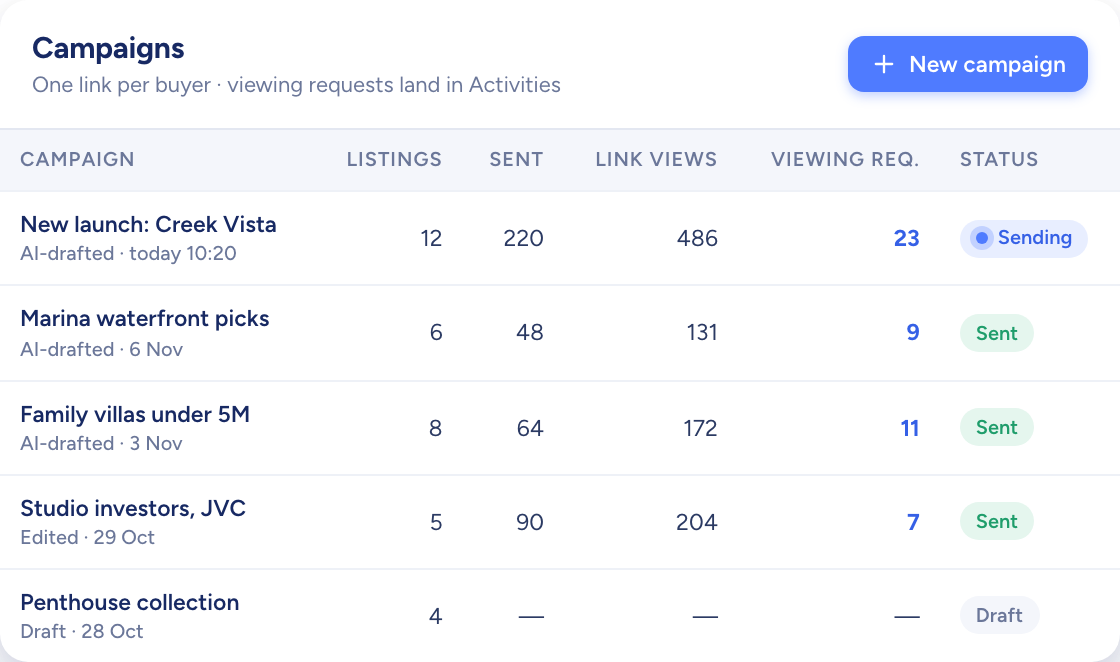
A table of campaigns with listings, link views and viewing requests per campaign

What comes out

  • Ranked matches AI Match %
  • Shared shortlists Listing pageViewing requests
  • Deals by stage KanbanCommission estimate
What it does

Move in from your spreadsheets

Import contacts, listings and properties from CSV files of up to 10,000 rows each. Match your columns to the fields, start the import, and an email tells you when it has finished.

  • Contacts, listings and properties
  • 10,000 rows a file at most
  • An email when each import is done
A white model desk buried in loose forms, sticky notes and a corded phone
You add
  • Contacts CSV
  • Listings CSV
  • Properties CSV
Raptor Neo

Ten factors per buyer, one ranked list per listing

Each buyer or tenant has a profile of budget, size, areas and rooms, plus a weighting from 1 to 5 on ten factors such as price, location and building age. AI Match turns that into a percentage for every listing, in both directions.

  • Listings suggested for each buyer
  • Buyers suggested for each listing
  • Hand-picked folders beside the AI list
The raptor chick watching over rows of white model houses, one of them lit blue

Deals on the stages you sell by

Keep separate stage lists for new developments and resale, then reorder, hide or add stages, each with its own fields. Deals show as a table, as cards or on a kanban board you drag between stages.

  • Separate stages for launches and resale
  • Custom fields for each stage
  • Drag a card to move a deal on
A model house moving along a track through a series of white arches towards a key

How agencies in Asia use Raptor Neo

Open any module below to see how it does the job.

Questions

Asked and answered

Can I publish to property portals in Asia?

Not today. Portal publishing covers Property Finder, Bayut and Dubizzle, which serve the UAE.

In Asia, agencies share listings through campaign links, PDF sales sheets and landing pages.

Does Raptor understand Chinese?

Yes. Ask Raptor, the assistant, in Traditional Chinese or English and it replies in the language you used. AI-drafted listing titles and descriptions are in English.

Can I set my own currency and units?

An admin sets the workspace's country, currency, unit of measurement (square metres or square feet) and timezone once, and every price, area and timestamp follows them.

How big can an import be?

Up to 10,000 rows per CSV file. A larger file needs splitting before you upload it.

Your Asia pipeline,all in one view.

Start the free trial today, or book a demo and see it run on your own listings.