Skip to content
Rentals

Landlords, tenants and every let, in one view

Rent listings carry the cheque count and payment method, tenants and landlords live on the same contact records, and viewing requests from your shared links land in Activities, ready to confirm.

A white model phone among map pins, a key and a speech bubble
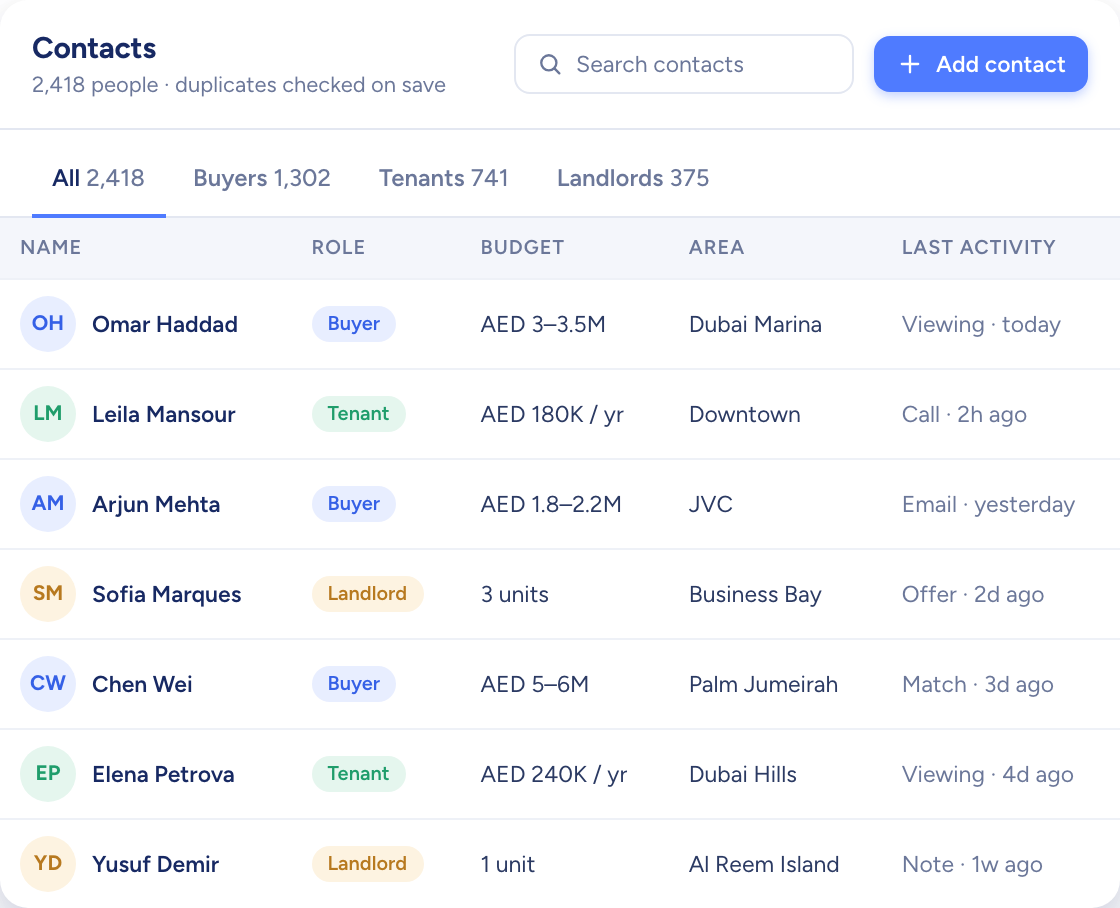
The contacts table with buyers, tenants and landlords, their budgets, areas and last activity

Raptor Neo takes on

Keeping rent listings complete, suggesting tenants for them and lining up viewing requests for you to confirm.

You keep

Showing the flat and agreeing the lease.

  • Cheques and payment method on every rent listing
  • One contact can be tenant, landlord and buyer
  • Viewing requests arrive straight in Activities
How it flows

Instructions and tenants in, viewings out

What goes in

  1. 01 Landlord instructions RentChequesFurnishing
  2. 02 Tenants Rent profileBudgetMove-in date
  3. 03 Shared links Listing pageAdd to viewings
The contacts table with buyers, tenants and landlords, their budgets, areas and last activity

What comes out

  • Rent listings live Property FinderBayutDubizzle
  • Tenants matched AI Match %
  • Viewings booked CalendarConfirmation email
What it does

Rent listings with the fields a let needs

Set a listing to Rent and it asks for the number of cheques and the accepted payment method, alongside furnishing, view, rooms and area. The Rent tab keeps letting stock apart from sales.

  • Number of cheques, from 1 to 12
  • Furnished, semi-furnished or unfurnished
  • Listing type fixed once the listing exists

Three model doors in a white wall, one navy, with keys hanging on a rack

Tenant or landlord, still one contact

Give a contact every role that applies. A landlord letting out one flat while hunting for another stays on a single record, with a rent profile, a buy profile and the listings they own.

  • Rent profile with budget, areas and move-in date
  • Matching listings suggested for each tenant
  • Matching tenants suggested for a landlord's listings
A navy card-index box of white cards beside a corded phone and model houses
The contacts table with buyers, tenants and landlords, their budgets, areas and last activity

Viewing requests in, viewings booked

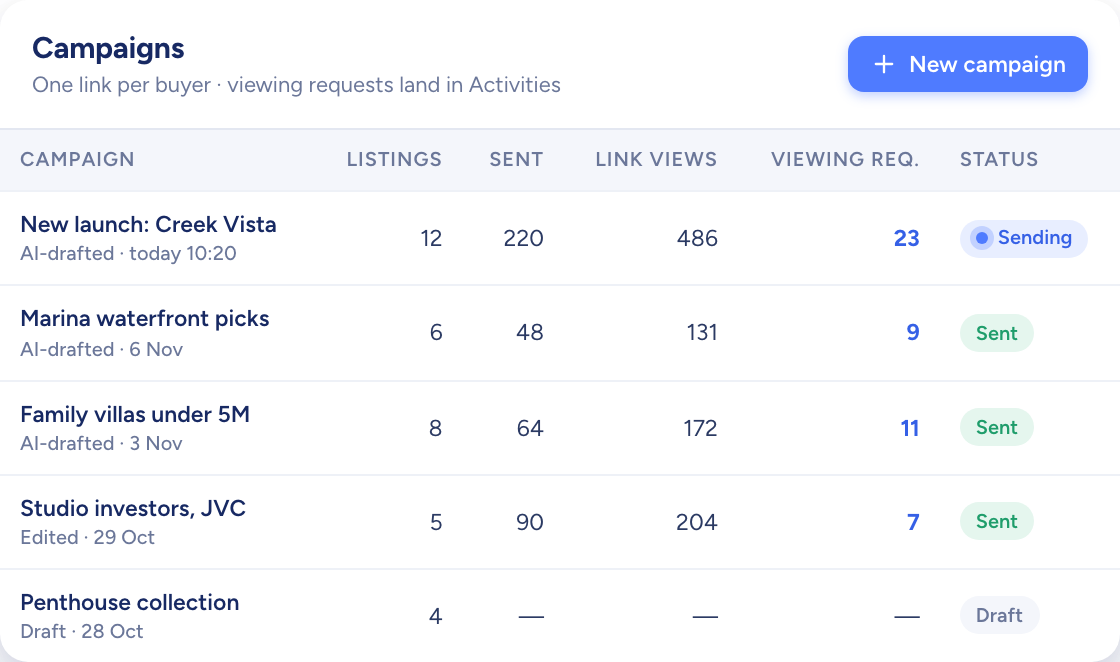
Share listings through a campaign link. The tenant picks the ones they like and asks to view them; you get an email, open the request in Activities and confirm the viewing, and the tenant gets a confirmation email.

  • Week, day and month calendar views
  • Viewings, calls and events in one list
  • Feedback recorded for each listing viewed
Paper planes flying out of a white model mailbox past two model houses
A table of campaigns with listings, link views and viewing requests per campaign

How letting teams use Raptor Neo

Open any module below to see how it does the job.

Questions

Asked and answered

Which payment details does a rent listing hold?

The accepted payment method (cash, instalments or both) and the number of cheques, from 1 to 12. Both are asked for on rent listings only.

Can I turn a sale listing into a rent listing?

No. A listing's type is fixed once it is created, so the other type needs a listing of its own.

How does a tenant ask for a viewing?

Through the link you share from a campaign. They choose listings, add them to viewings and offer the times that suit them.

The request reaches you by email and in Activities, where you confirm the viewing or cancel the request.

Can I log calls with landlords too?

Yes. Calls, viewings and events are all activities, logged against the contact and shown on the same calendar. A call can be marked inbound or outbound.

Every dealin sight.

Start the free trial today, or book a demo and see it run on your own listings.