Skip to content
For growing agencies

More agents, more teams, one clear view

Add people as you hire, group them into teams and give each role the access it needs. The same dashboard reads for one agent, one team or the whole agency.

A model house moving along a track through a series of white arches towards a key
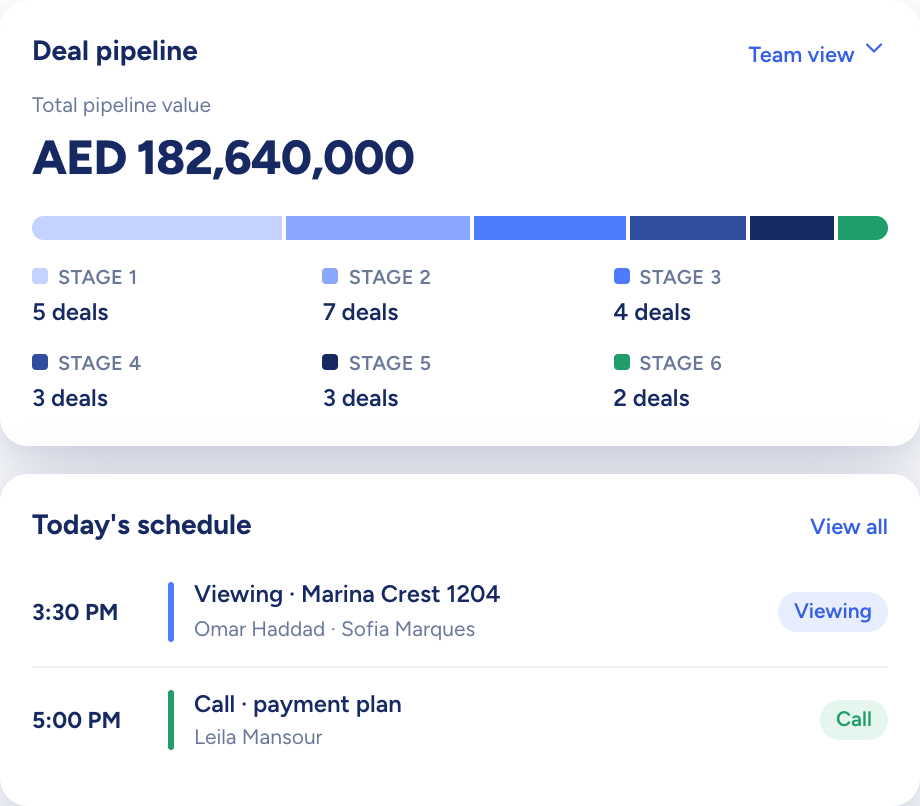
The dashboard: total pipeline value by stage above today's schedule

Raptor Neo takes on

One set of roles, teams and permissions, however many agents you add.

You keep

The hiring, the coaching and the next launch.

  • Permissions set role by role, module by module
  • Separate deal boards for new development and resale
  • One dashboard for an agent, a team or the agency
How it flows

A bigger floor in, the same clear picture out

What goes in

  1. 01 The roster UsersTeamsRoles
  2. 02 Your patch LocationsProperty types
  3. 03 New-build stock TowersFloorsUnits
The dashboard: total pipeline value by stage above today's schedule

What comes out

  • Access by role Per moduleContact sharing
  • Deals by stage KanbanTwo flows
  • Admin dashboard Whole agency
What it does

Grow the floor without starting over

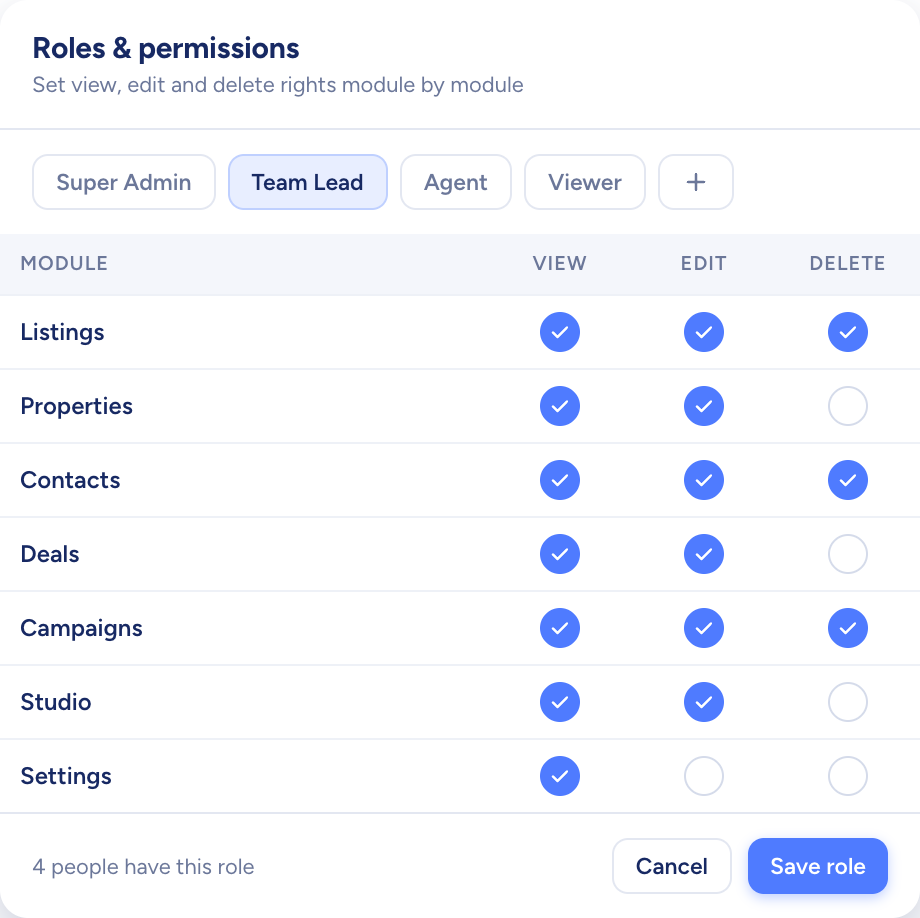
Add a user, set their password, then pick their role and team. Start from the four built-in roles or write your own, with permissions chosen for each module. Every active user takes one seat, and you add seats as you hire.

  • A new custom role starts with no permissions
  • Each team has its own lead
  • A deactivated user frees their seat
A white model crane lifting a navy panel onto a stack of printed boards
A roles screen setting view, edit and delete rights for each module

Two kinds of deal, two clear boards

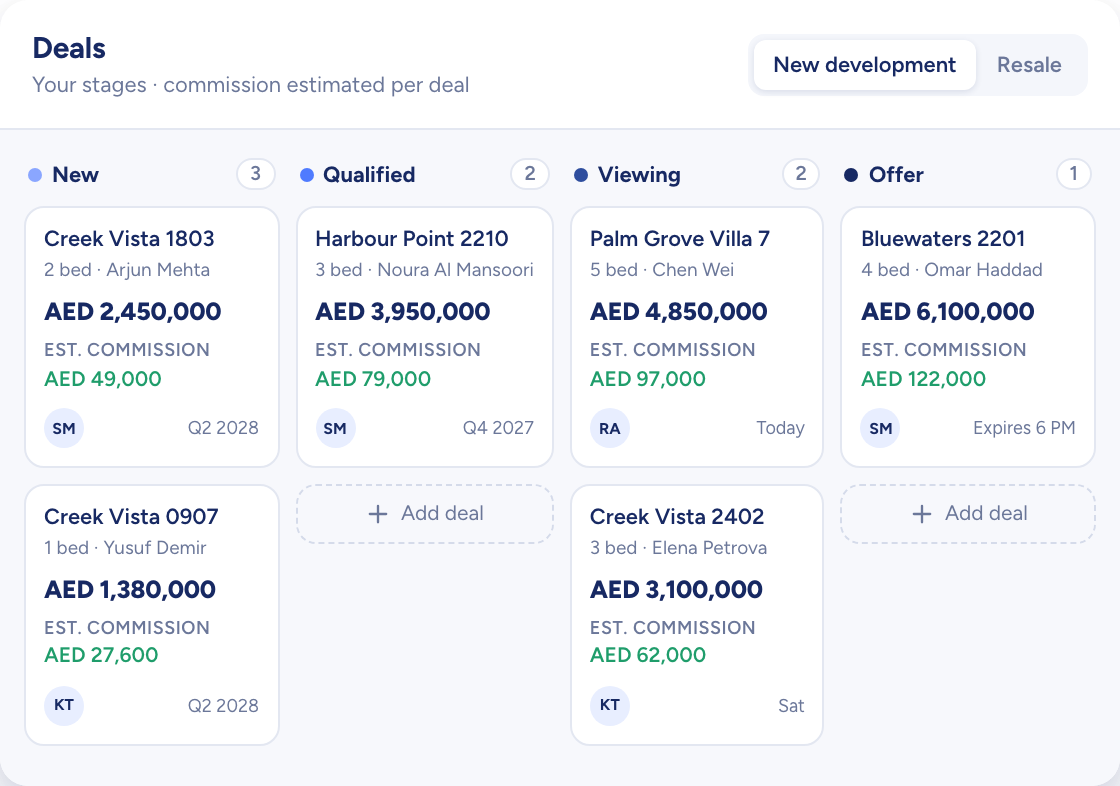
New development and resale each follow their own preset stages. Drag a card to move a deal on, hide the stages your agency skips and add the ones it needs.

  • Table, card and kanban views
  • Custom fields on each stage
  • How long each deal has sat in its stage
Three tall white model towers lit blue, above a waterfront row of low buildings and palms
Deals on a board by stage, each card with its price and estimated commission

From one desk to the whole agency

Each agent's dashboard shows their own numbers, team leads switch to the team, and admins with full access get the agency-wide totals: contacts added this month, viewings booked, open deals and commission won.

  • Personal, team and agency-wide scopes
  • The same layout at every level
  • The agent named on recent viewings and deals
A curved white model desk with three blank screens and a blue glow
You add
  • Your own numbers
  • Your team
  • The whole agency
Raptor Neo

How growing agencies use Raptor Neo

Open any module below to see how it does the job.

Questions

Asked and answered

Is there a limit on how many agents we can add?

You buy one seat for each active user and add seats as you grow. The team size you give at sign-up is only for our sales follow-up: it doesn't cap the seats you can buy.

Can we bring our existing data across?

Yes. Listings, properties, contacts and locations import from CSV files. When a listings or properties import has finished, an email lets you know.

Can an agent see contacts that belong to another team?

Each contact has one owner, who can share it with colleagues for viewing or editing. Without access, an agent sees the contact's last name, phone and email masked and can ask for access.

Do new development and resale deals follow the same stages?

No. Each has its own set of preset stages. You can reorder them, hide the ones you don't use and add stages of your own.

Every dealin sight.

Start the free trial today, or book a demo and see it run on your own listings.