Skip to content
AI Match

Sharp eyes on every listing, its best buyers ranked

Raptor Neo weighs each listing against the saved requirements of every buyer and tenant, gives each pair a percentage, and recalculates as profiles, prices and stock move. Ten criteria, each rated for how much it matters.

The raptor chick watching over rows of white model houses, one of them lit blue
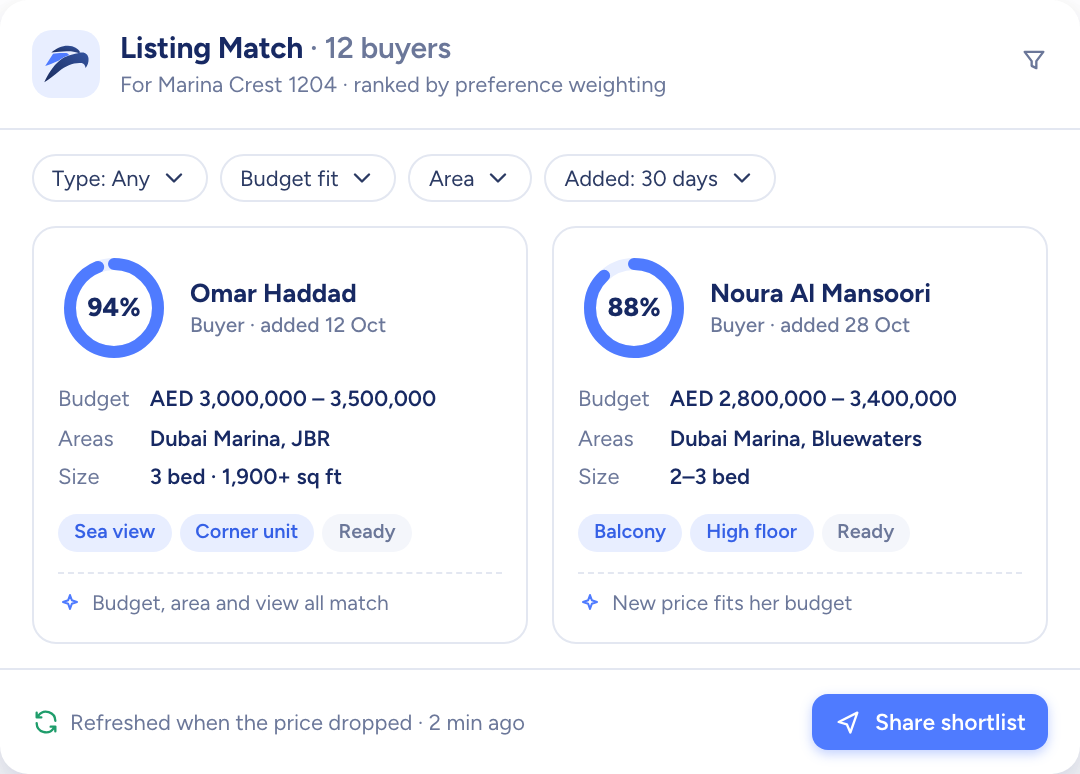
Buyers ranked for one listing by match percentage, with budget, areas and size
  • An AI Match % on each listing and contact pair
  • Scores refresh when a profile or a listing changes
  • Hand-picked folders kept apart from the AI results
How it flows

Requirements in, ranked matches out

What goes in

  1. 01 What the buyer needs Budget rangeSize rangePreferred location
  2. 02 What matters most Floor levelPet friendlyTransportation
  3. 03 Your stock New listingsUpdated details
Buyers ranked for one listing by match percentage, with budget, areas and size

What comes out

  • On a listing Best-fit buyers
  • On a contact Best-fit listings
  • The next move Add to campaignShare link
What it does

Open a listing and see who it suits

The listing record lists the buyers and tenants it fits, each with an AI score and a short written analysis of why. Choose the ones worth calling and add them to a campaign without leaving the page.

  • An AI score on every match
  • A written analysis beside each score
  • Contacts you can't open stay masked

The raptor chick watching over rows of white model houses, one of them lit blue
Buyers ranked for one listing by match percentage, with budget, areas and size

Open a contact and see what suits them

A buyer's or tenant's profile shows the listings that fit, with the score and a description. For a landlord it runs the other way, and Raptor Neo suggests the contacts who suit their listings.

  • Ten criteria, each rated 1 to 5
  • Every rating starts at 5 until you change it
  • Recalculated when the profile is edited
A navy card-index box of white cards beside a corded phone and model houses
You add
  • Budget and size
  • Preferred areas
  • Ratings 1 to 5
Raptor Neo

Your own picks, kept in folders

Manual Match holds the listings you choose yourself. Bookmark a listing into a folder, and when the set is right, turn it into a campaign with a share link for the client.

  • Folders are private to the agent who made them
  • A Default folder that is always there
  • Bookmark from the listing or from the table
A curved white model desk with three blank screens and a blue glow

AI Match at work

The jobs it takes off an agent's desk, week in, week out.

Questions

Asked and answered

What does AI Match look at?

Two things from each contact. First, their requirements: budget, size range, preferred location, property type and the rooms they need. Second, how much each of ten criteria matters to them, rated from 1 to 5. The criteria include price, location, layout, floor level, pet-friendliness and transport.

When are the scores worked out again?

When a contact's requirements or ratings change, when a listing's details change, and when a new listing is added.

What is Manual Match?

Your own folders of hand-picked listings, kept separate from the AI scores. Save listings into a folder with the bookmark, then share them with a client through a campaign.

Folders are private to the agent who creates them.

Will I see contacts I don't have access to?

You see every potential buyer for a listing, but for a contact you can't access, the last name, email and phone are masked. You can request access, or start a campaign straight away with the contacts you can open.

How does a match become a campaign?

Pick the listings for a contact, or the contacts for a listing, and choose Create Campaign & Share Listings. Raptor Neo creates the campaign with a share link you can copy or send by email.

Is AI Match in the mobile app?

The mobile app is coming soon. AI Match runs in the web app today.

Every dealin sight.

Start the free trial today, or book a demo and see it run on your own listings.